
Task Overview
We're teaching AI models to reason about images the way a person would. Your mission is to create challenging visual question-and-answer pairs from image datasets to train the models' visual reasoning.
The 2 platforms you must work across for every task
SuperAnnotate
The annotation platform for this project (superannotate.com). This is where you request images and write annotations. Information from SuperAnnotate is necessary to fill out the Shadow Task on Handshake AI. Most of your time tasking will be spent here. For annotators: Submit each Handshake AI task (Shadow Task) as soon as its annotation is complete and has passed the Model Stump Check. Only submit the full SuperAnnotate task after all individual annotations are complete and all their Handshake AI tasks are submitted. The new Model Stump Check (Stump the Model) is currently for annotators only and is not part of review/QC or audit workflows. If this changes, there will be an announcement and the playbook will be updated.
SuperAnnotate does not track time for payment. See the Handshake AI box below for information on how to track time to ensure you get paid.
Handshake AI
Where you log Shadow Tasks (Handshake AI). Shadow Tasks are forms that must be filled out for every annotation you complete on SuperAnnotate. They are not a task on their own; they do not contain images for you to annotate.
Your submission is the proof that you completed a task. Each approved annotation is paid at a flat rate per task, regardless of time spent, and payment follows once it clears review, quality audit, and the client check. Without a submission there's no record the work was done, so it cannot be paid.
Either way, fill them out carefully and follow the instructions at each step.
Task workflow overview
A high-level overview; you'll find more detailed requirements in the workflow steps. Each task contains one image and 1–3 annotations, and takes about 15 minutes per annotation.
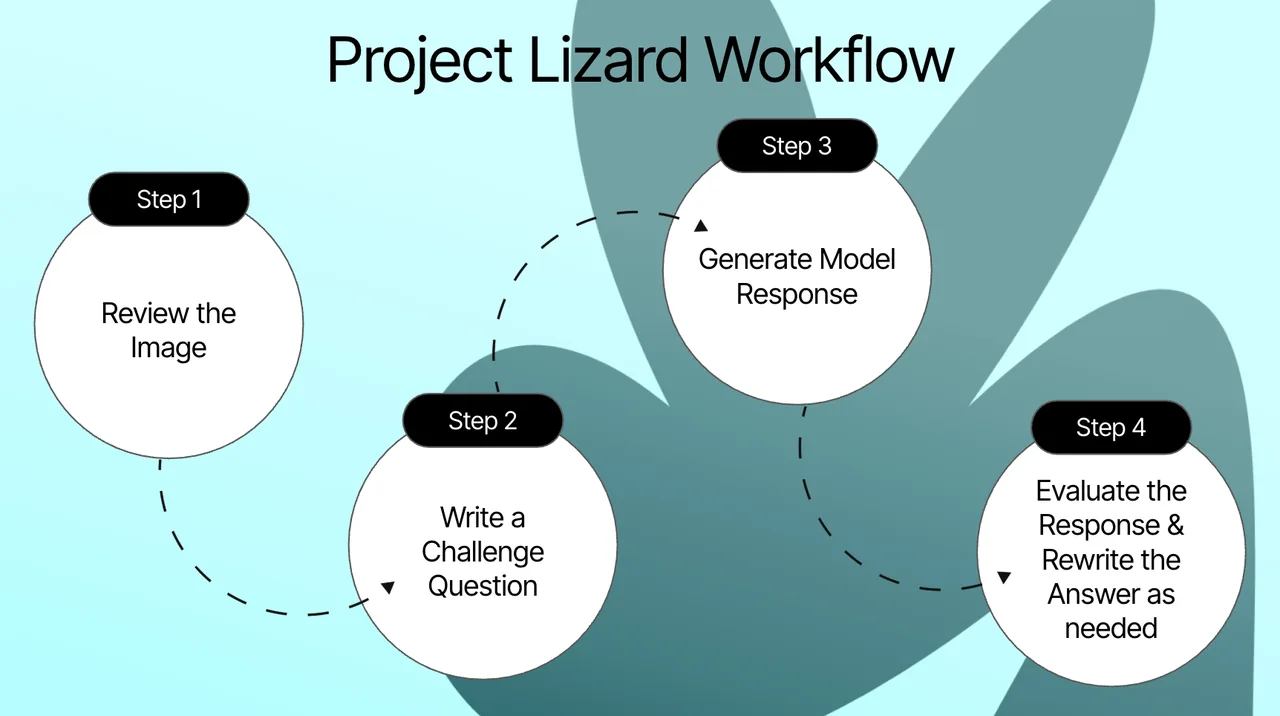
- 1
Review the image
Each task has a pre-loaded image in SuperAnnotate. Review it for quality and readability. If clear and workable, continue. Only skip an image if it is truly unusable. See the Image Feasibility page in the Common Errors section for more details.
- 2
Write a challenge question
Tag the reasoning skills your question relies on, then write a question the model must look at the image to answer. Keep it clear, standalone, and resolvable to exactly one correct answer, and state the required answer format. Do not allow answer variance or tolerance ranges such as “any value within 5% is acceptable”: they create multiple accepted final answers, even with whole-percent rounding. Specify rounding that yields one verifiable answer. Chartography exception: if the task category says Chartography, an estimated value read from gridlines may use a stated accepted range or tolerance, and the model's wrong answer must fall outside it. All other tasks keep this rule.
- 3
Generate model response
Click "Generate Model Response" and wait (up to ~20 seconds). Read the model's answer carefully.
- 4
Ensure the model response is wrong, give it a thumbs-down, and provide the correct answer
Every Model Generated Answer (MGA) must be wrong and receive a thumbs-down rating! Once you have stumped the model, enter the correct answer in the "Rewrite Answer" field.
❓ Can I create more annotations for the same image?
Every image needs at least one strong, submittable annotation. You can submit up to 3 annotations per image, but only when you're confident all of them are strong.
Each new annotation must be substantially different from the ones before it. Annotations that are too similar to each other won't be accepted. Always prioritize quality over quantity.