
Welcome to Project Lizard 🦎
What you'll do here
You'll get an image, such as a chart or table. Write a hard question about it that the AI answers wrong. Your question and the correct answer are used to train the AI.
Visual Question Answering (VQA) means asking a question that can only be answered by looking at an image. We call these image questions.
Task
One image, 1–3 annotations, about 15 minutes per annotation.
Annotation
One question plus its correct answer.
Stumping the model
Writing a question the AI gets wrong.
A strong image question:
Is image-based.
The answer comes from the image. Outside knowledge is fine only when it connects to what the image shows.
Takes real thinking.
It needs at least two thinking steps. For example, find two numbers, then compare them.
Is clear and unambiguous.
It has exactly one correct answer, in a short-answer (1-5 words) or multiple-choice format. Answer variance or tolerance ranges such as “any value within 5% is acceptable” are unacceptable: they allow multiple final answers. Rounding must yield one verifiable answer. Exception: Chartography-category tasks may give an estimated value with a stated accepted range.
For example
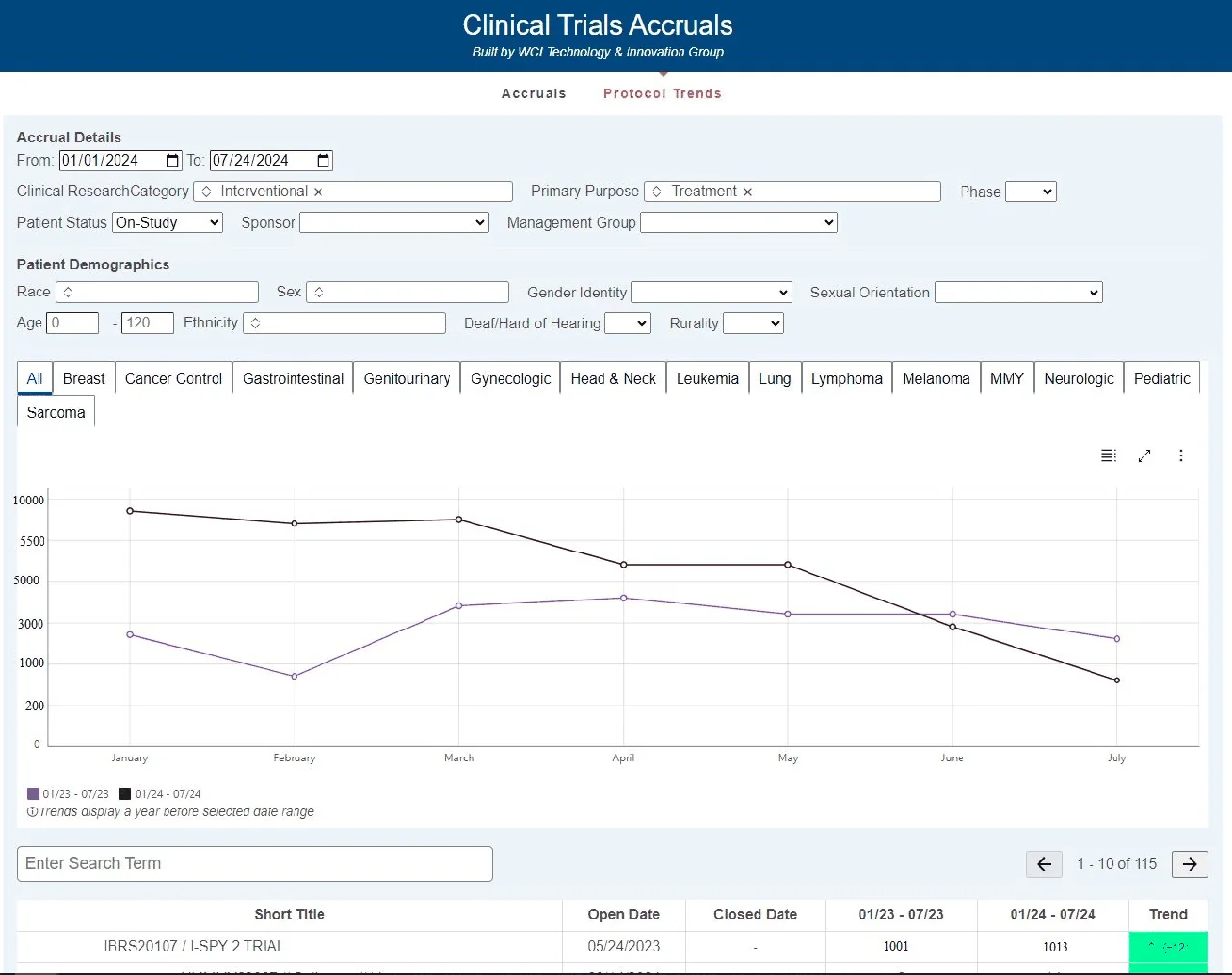
Weak question
“What years are compared on this graph?”
Anyone can see it at a glance, and the model gets it right.
Strong question
“In which month did the 2023 numbers first exceed the 2024 numbers on the graph? Please answer with the full name of a month (e.g., February).”
Why it works
- Image-based. The answer only exists in the graph.
- Takes real thinking. Read both lines month by month, then find the first crossover.
- Clear and unambiguous. One month, in a fixed answer format.
Correct answer: May
See more examples: Golden Examples · Bad Examples
You can write 1-3 annotations on the same image, as long as each one is substantially different.
Where to start
What do you need right now? Follow the path that matches where you are in onboarding.
- 1
- 2
Join a live onboarding call or watch the recordings
Recorded Trainings has the walkthrough of this guide, the SuperAnnotate walkthrough, and the new Onboarding Bootcamp October 20th recording.
- 3
Get logistics right
Follow the Training Task Quick Start to get set up on Slack, SuperAnnotate, and your Handshake AI task (your Handshake AI submission form).
Complete your Yardstik background check.
- 4
Learn and practice your workflow
Read Step 0 to Step 5 of the Task Workflow. They walk you through a task from start to finish.
- 5
Ship a clean task
Review the SQS (Task Quality) Guide before you submit.
Quick links
Need Help?
For day-to-day questions, search or post in the Project Lizard Slack channels first. Your teammates likely have the same question.
You will receive Slack access within 24 hours of setup. Please wait the full window before asking about it.
If you're still stuck, bring general questions about the project, tasking, and Slack channels to the Slack Community Ambassadors (SCAs), the specialist contacts for fellows. Contact the DOLs (project leads who handle escalations and exceptions) only when an SCA tells you to, or when it's urgent.
Slack Community Ambassadors (SCAs)
Evelyn Tran
@Evelyn Tr. · Specialist
Jason Solocinski
@Jason So. · Specialist
DOLs
Aidan Hesselroth
@Aidan · Handshake AI